AI Image Tag API Documentation - Intelligent Photo Tagging & Classification
Overview
The AI Image Tag API is a powerful AI photo tagging service that automatically generates intelligent tags, titles, and descriptions for images. This AI image tagging API leverages advanced computer vision and machine learning technologies to analyze image content and provide comprehensive metadata generation. Perfect for automatic image tagging, content management, and photo classification workflows.
Application Scenarios
The AI Image Tag API empowers you to efficiently implement AI photo tagging and metadata generation in the following areas:
- SEO Optimization: Automatically generate relevant tags and descriptions to improve image search visibility.
- Content Management Systems: Streamline digital asset organization with intelligent categorization.
- Social Media Automation: Auto-tag photos for enhanced discoverability and engagement.
- E-commerce Product Management: Generate comprehensive product tags and descriptions for better searchability.
- Digital Asset Libraries: Organize and classify large image collections with automated metadata.
- Blog and Website Content: Enhance image SEO with automatically generated alt text and captions.
- Mobile App Integration: Add intelligent photo tagging service capabilities to mobile applications.
API Keys
To access the AI Image Tag API, you must first obtain a valid API key. This key is used to authenticate your requests and ensure secure access to the API.
Obtaining an API Key
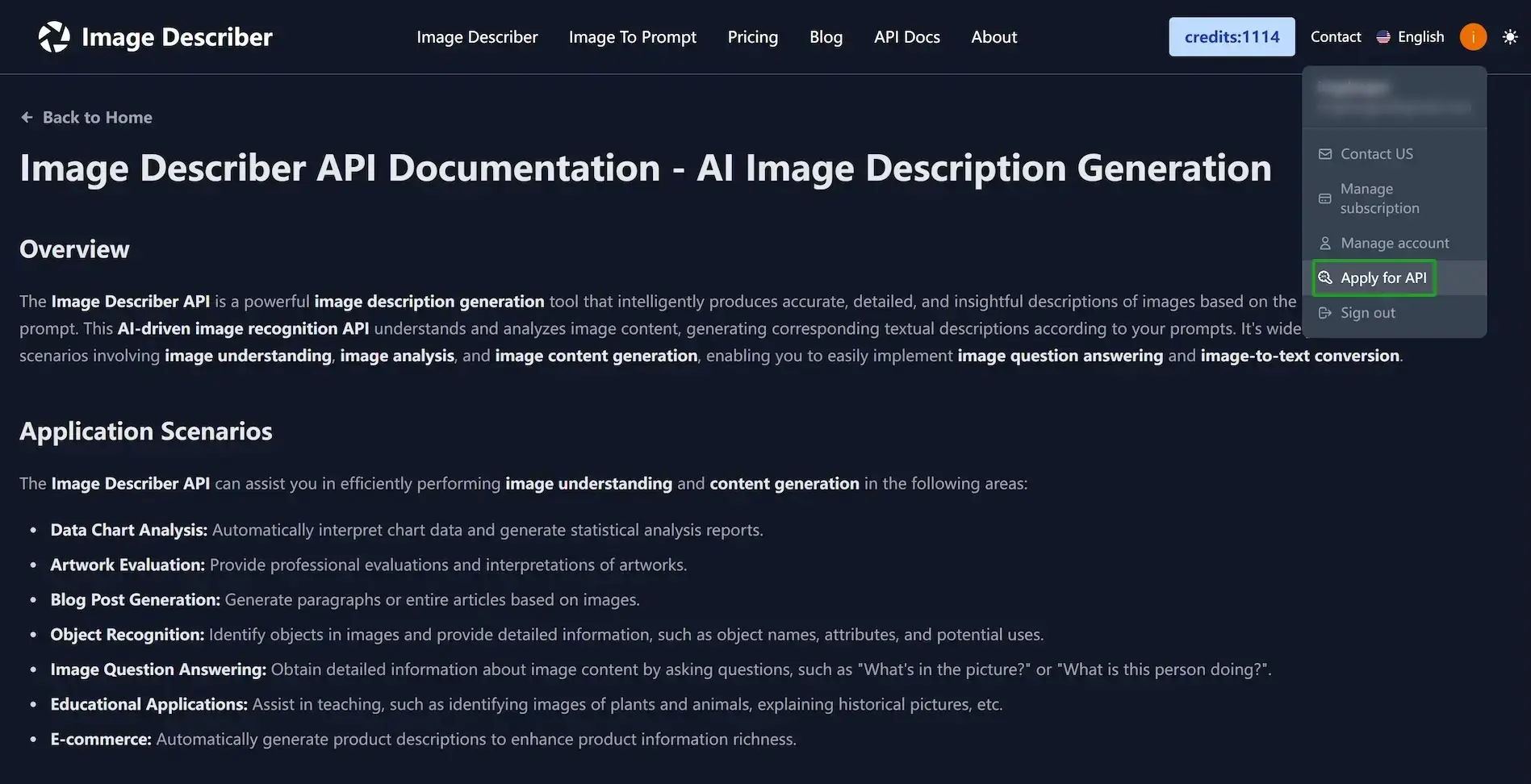
- Access the API Keys Management Page: Log in to the system, then click your user avatar in the top-right corner. In the dropdown menu, click "Apply for API" to open the API Keys Management Page.
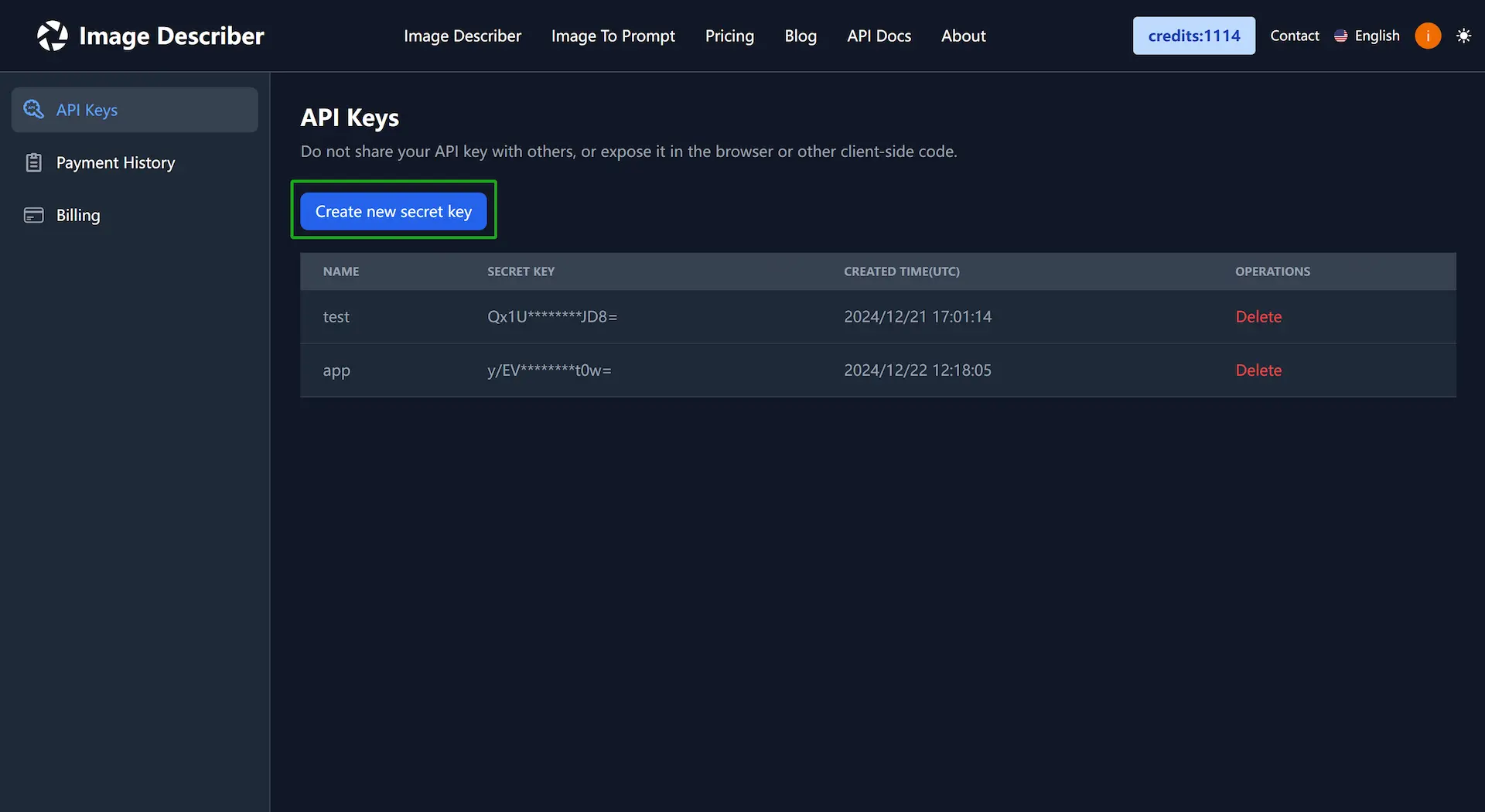
- Create a New Key: Click "Create New Key", enter a name for your key in the pop-up dialog, and then click "Create".
- Copy and Store Your Key: Note that the key will only be displayed in full once. Click the copy icon to copy the key to your clipboard, and then click "Confirm" to close the dialog.
Important: Do not share it with others or expose it in the browser, client-side code, or any other insecure location. Keep your key safe to prevent unauthorized access.
API Endpoint
POST https://api.imagedescriber.app/api/v1/generate_tags
Request Parameters
Request Headers
Request Body
The AI image tagging API accepts the following request structure:
{
  "image": "data:image/jpeg;base64,{image_base64_data}",
  "lang": "en"
}
Supported Languages
Request Example (cURL)
curl --location 'https://api.imagedescriber.app/api/v1/generate_tags' \
--header 'content-type: application/json' \
--header 'authorization: Bearer your_api_key' \
--data '{
    "image":"data:image/jpeg;base64,/9j/4AAQSkZJRgABAQE...",
    "lang":"en"
}'
Request Example (Python)
import requests
import base64

def image_to_base64(image_path):
    """Convert image to Base64 encoding"""
    with open(image_path, "rb") as image_file:
        encoded_string = base64.b64encode(image_file.read()).decode("utf-8")
    return encoded_string

def generate_image_tags(api_key, image_path, lang="en"):
    """Generate AI image tags using the AI Image Tag API"""
    url = "https://api.imagedescriber.app/api/v1/generate_tags"
    headers = {
        "content-type": "application/json",
        "authorization": f"Bearer {api_key}"
    }

    image_base64_data = image_to_base64(image_path)
    payload = {
        "image": f"data:image/jpeg;base64,{image_base64_data}",
        "lang": lang
    }

    response = requests.post(url, headers=headers, json=payload)

    if response.status_code == 200:
        result = response.json()
        tags_data = result["data"]["tags"]
        print("Generated Tags:", tags_data["tags"])
        print("Title:", tags_data["title"])
        print("Description:", tags_data["description"])
        print("Credits Remaining:", result["data"]["credits"]["remaining"])
    else:
        print(f"Error: {response.status_code}")
        print(response.text)

# Example usage
api_key = "your_api_key"
image_path = "your_image.jpg"

generate_image_tags(api_key, image_path)
Request Example (Next.js)
import fs from 'fs';

// Server-side implementation
const buffer = await fs.readFileSync("/temp/test.jpg");
const base64Image = buffer.toString('base64');
const imageData = `data:image/jpeg;base64,${base64Image}`;

// Client-side implementation
const file: File = /* file from input or drop event */;
const arrayBuffer = await file.arrayBuffer();
const bytes = new Uint8Array(arrayBuffer);
const base64Image = btoa(String.fromCharCode.apply(null, bytes as any));
const imageData = `data:${file.type};base64,${base64Image}`;

const body = {
  "image": imageData,
  "lang": "en"
};

const response = await fetch('https://api.imagedescriber.app/api/v1/generate_tags', {
  method: 'POST',
  headers: {
    'Content-Type': 'application/json',
    'Authorization': 'Bearer {your_api_key}'
  },
  body: JSON.stringify(body),
});

const result = await response.json();
console.log('AI Generated Tags:', result.data.tags.tags);
console.log('Generated Title:', result.data.tags.title);
console.log('Generated Description:', result.data.tags.description);
Response
Response Body (JSON Response)
The AI photo tagging service returns a comprehensive response containing generated tags, title, description, and credit information:
{
  "code": 0,
  "message": "success",
  "request_id": "unique_request_id_string",
  "data": {
    "tags": {
      "tags": [
        "tag1",
        "tag2",
        ...
      ],
      "title": "Concise and engaging image title",
      "description": "Detailed image description"
    },
    "credits": {
      "amount": "credits consumed by this call",
      "remaining": "total credits remaining after this call"
    }
  }
}
Request Limits
To ensure service stability and fairness, each API key is limited to 30 requests per minute (1800 requests per hour). Requests exceeding this limit will be rejected with error code 1004.
Credit System
- Each successful AI image tagging API call consumes 1 credit.
- Content blocked by the security filter does not consume credits.
- System errors do not consume credits.
How to Get More Credits?
You can visit the Credit Recharge Page to purchase credit packages to support more AI photo tagging API calls. We offer various packages to meet the needs of different users.
Error Handling
The following table lists common error codes, their meanings, and solutions:
Image Format Details
Currently supported image formats include: JPG, JPEG, PNG, WebP. The maximum image size is 4MB.
Best Practices for AI Image Tagging
- High Resolution: Use clear, high-resolution images for better AI photo tag accuracy.
- Good Lighting: Well-lit images produce more accurate tags and descriptions.
- Clear Subject: Images with distinct subjects and objects generate more relevant tags.
- Supported Formats: Stick to supported formats (JPG, PNG, WebP) for optimal results.
Use Cases and Integration Examples
SEO Enhancement
Use the AI image tagging API to automatically generate alt text and meta descriptions for your website images:
// Enhance image SEO with AI-generated tags
const enhanceImageSEO = async (imageElement, apiKey) => {
  const canvas = document.createElement('canvas');
  const ctx = canvas.getContext('2d');
  canvas.width = imageElement.width;
  canvas.height = imageElement.height;
  ctx.drawImage(imageElement, 0, 0);

  const base64Image = canvas.toDataURL('image/jpeg');

  const response = await fetch('/api/v1/generate_tags', {
    method: 'POST',
    headers: {
      'Content-Type': 'application/json',
      'Authorization': `Bearer ${apiKey}`
    },
    body: JSON.stringify({ image: base64Image })
  });

  const result = await response.json();
  const { tags, title, description } = result.data.tags;

  // Update image attributes for SEO
  imageElement.alt = description;
  imageElement.title = title;
  imageElement.setAttribute('data-tags', tags.join(', '));
};
Content Management Integration
Integrate AI photo tagging into your CMS workflow:
# Bulk process images in a content management system
import os
import requests
from pathlib import Path

def bulk_tag_images(directory_path, api_key):
    """Process all images in a directory with AI tagging"""
    image_extensions = ['.jpg', '.jpeg', '.png', '.webp']

    for image_path in Path(directory_path).iterdir():
        if image_path.suffix.lower() in image_extensions:
            try:
                # Generate tags for each image
                result = generate_image_tags(api_key, str(image_path))

                # Save metadata to accompanying file
                metadata_path = image_path.with_suffix('.json')
                with open(metadata_path, 'w') as f:
                    json.dump(result['data']['tags'], f, indent=2)

                print(f"Processed: {image_path.name}")

            except Exception as e:
                print(f"Error processing {image_path.name}: {e}")

# Usage
bulk_tag_images("/path/to/images", "your_api_key")
Contact Us
If you have any questions or suggestions about our AI Image Tag API or photo tagging service, please feel free to contact us through the following methods:
- Email: support@imagedescriber.app
- Technical Support: customer support team
Start using the AI Image Tag API now and unlock the power of intelligent photo classification and automatic image tagging!